Relative and Absolute References in Excel
When you copy a formula, Excel usually changes the cell references automatically. That is useful most of the time, but sometimes one value needs to stay fixed. That is where relative and absolute references matter.
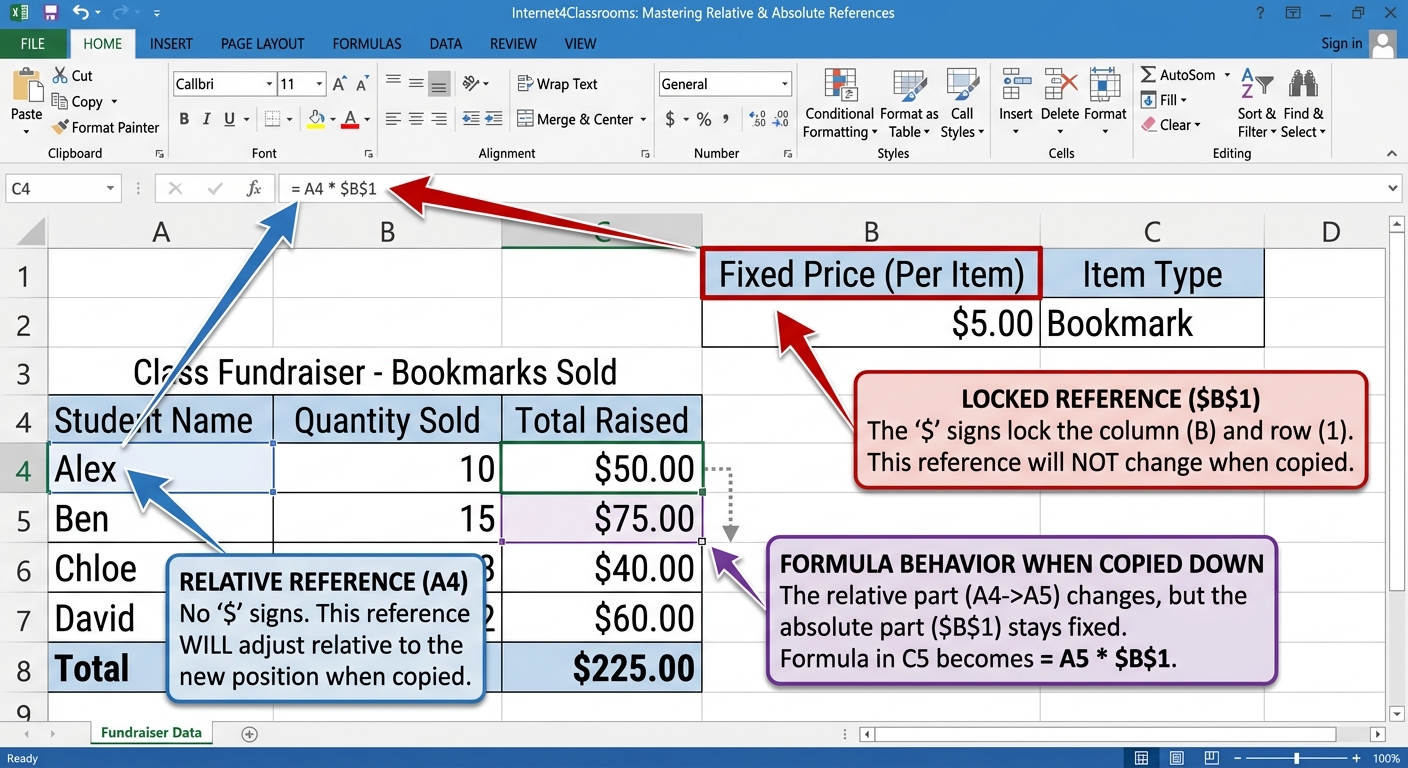
Relative references
A relative reference changes when the formula is copied. If you copy a formula down one row, Excel adjusts the row numbers for you.
Absolute references
An absolute reference stays fixed. The dollar sign locks the row, the column, or both. For example, $B$1 always points to the same cell.
Try it
Imagine a class fundraiser sheet with one tax or fee rate stored in a single cell. If every row should use that same rate, an absolute reference keeps the formula from shifting when copied.
Common mistakes
- Copying formulas without checking whether the references changed correctly
- Using dollar signs everywhere when only one value needs to stay fixed
- Forgetting that relative references are often the right choice for repeated row-by-row work
Next step: Continue to Autofill and Copy Formulas.
Internet4classrooms is a collaborative effort by
Susan Brooks and Bill Byles.