Enter and Edit Data in Excel
Links Verified: March 19, 2026
Entering and editing data in Excel is one of the first spreadsheet skills every beginner should learn. Once you know how to type, edit, and move from cell to cell, it becomes easier to build useful worksheets.
Click image for a larger view.
Types of Data
You can enter text, numbers, and dates in Excel cells. Text often labels information, while numbers and dates are used for sorting, totals, and formulas.
How to Enter Data
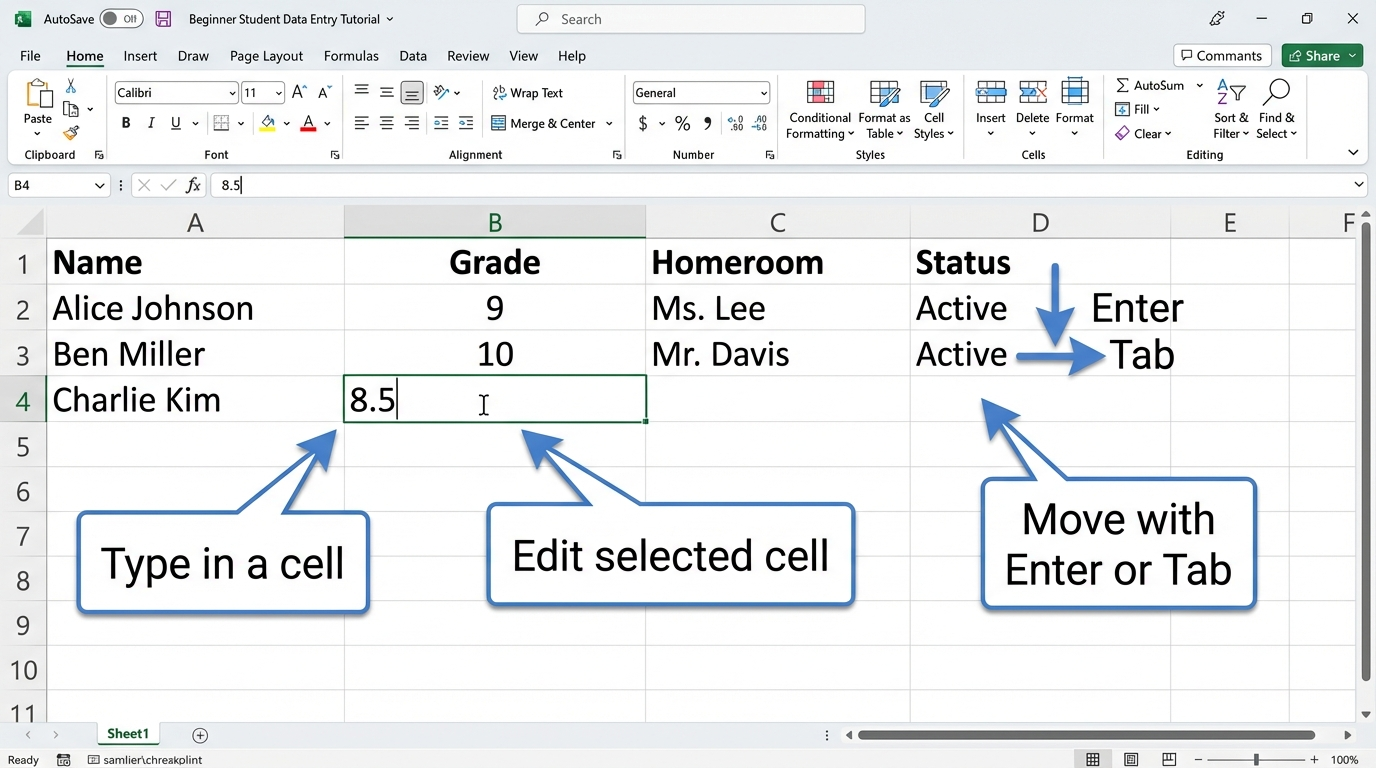
Click a cell, type your information, and then press Enter or Tab. Enter moves down and Tab moves across.
How to Edit Data
To change data, click the cell and type again, or double-click the cell to edit its contents.
Try It
- Create column headings for Name, Grade, Homeroom, and Status.
- Enter five student names.
- Correct one spelling mistake.
- Use Tab to move across a row and Enter to move down.
Next step: Continue to Format Cells in Excel.
Internet4classrooms is a collaborative effort by
Susan Brooks and Bill Byles.