| Sign Up For Our Newsletter |

| Sign Up For Our Newsletter |
Using Excel 2007 to Import Data from the Internet
You have found a data table that would be good for your class to analyze, but the data goes on forever and it would take more than one class period to record and enter the data. Worry not! Excel will import the data into a workbook, as long as the data is presented in the form of a table.
As an example, a web site presents 100 years of average temperature data for the state of New York . Visit the web site and copy the URL (web address). You will need that to tell Excel where to look for the data.
Next, open an Excel workbook. Click on the Data tab at the top of the ribbon. The first section of the Data tab is named
. Click on the second button in that section, From Web .

Excel opens a dialog box displaying your browser homepage with the URL of the page highlighted. Paste the copied web address into the Address box. A quick way to paste is to Hold down the Ctrl Key as you tap one time on the V key ( Ctrl + V ). You will have to scroll to find the data table. When you find it, click one time on the arrow next to the Data table and then click on the Import button.
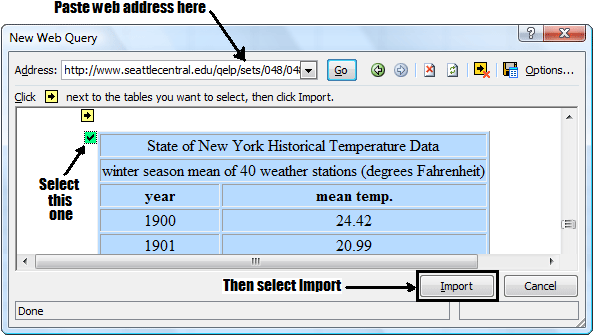
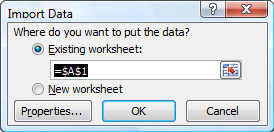
You have a choice to make. Excel is ready to import the data, but needs to know if you want it put into the existing workbook, or a new workbook.
All one hundred years of average temperatures is now ready for evaluation. The example used is probably much larger than you would use, but Excel imported the data very quickly.


Internet4classrooms is a collaborative effort by
Susan Brooks and Bill Byles.


advertisement
advertisement
Use of this Web site constitutes acceptance of our Terms of Service and Privacy Policy.



