| Sign Up For Our Newsletter |

| Sign Up For Our Newsletter |

Using the Drawing Tools Tab in Excel 2007
This tab only appears when a shape is selected. As soon as the shape is deselected, this tab disappears. Tip: If you are unsure what the function of a feature is, let your cursor hover over the button (in Excel) to see a pop-up box explaining the feature.
If you want to collapse the ribbon so that none of the buttons are displayed, double-click the name of the tab.
Insert Shapes 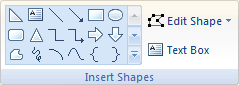
Shapes - Click on the down arrow (outlined in red in this drawing) to see all of the available shapes.
Edit Shape - Change the shape of this drawing, convert it to a freeform shape, or edit the wrap points to determine how text wraps around the drawing.
Text Box - Insert a text box that can be positioned anywhere on the page.
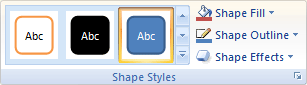
Styles - Click on the down arrow (outlined in red in this drawing) to see all of the available shapes styles.
Shape Fill - Fill the selected shape with a solid color, gradient, picture, or texture.
Shape Outline - Specify the color, width, and line style for the outline of the selected shape.
Shape Effects - Apply a visual effect to the selected shape, such as shadow, glow, reflection, or 3-D rotation.
WordArt Styles 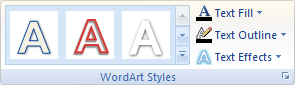
Styles -Click on the down arrow (outlined in red in this drawing) to see all of the available WordArt styles.
Text Fill - Fill the text with a solid color, gradient, picture, or texture.
Text Outline - Specify the color, width, and line style for the outline of the text.
Text Effects - Apply a visual effect to the text, such as shadow, glow, reflection, or 3-D rotation.
Arrange 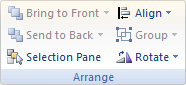
Bring to Front - Bring the selected object in front of all other objects so that no part of it is hidden behind another object.
Send to Back - Send the selected object behind all other objects.
Selection Pane - Show the Selection Pane to help select individual objects and to change their order and visibility.
Align - Align the edges of multiple selected objects. You can also center them or distribute them evenly across the page.
Group - Group objects together so that they can be treated like a single object.
Rotate - Rotate or flip the selected object.
Size 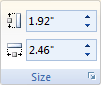
Height - Change the height of the shape or picture.
Width - Change the width of the shape or picture.
In the Table below, select which section of the Drawing Tools you would use to perform the stated action. [This quiz has not been completely written yet.]
2. Question 2
x
3. Question 3
x
4. Question 4
x
5. Question 5
x
6. Question 6
x
7. Question 7
x
8. Question 8
x
9. Question 9
x
10. Question 10
x

Internet4classrooms is a collaborative effort by
Susan Brooks and Bill Byles.


advertisement
advertisement
Use of this Web site constitutes acceptance of our Terms of Service and Privacy Policy.


