| Sign Up For Our Newsletter |

| Sign Up For Our Newsletter |

Using the Standard Toolbar with an Excel Worksheet
Learn the basic standard toolbar icons in Excel using this tutorial. There is a self checking quiz following the tutorial.
Standard | Formatting | Drawing
The Standard toolbar

This entire toolbar could become a floating window by double-clicking on the control bar at the far left end of this toolbar. That gives the following window, which can be placed anywhere on the screen:
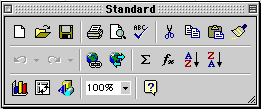
This toolbar can be restored to its original position by clicking in the gray bar at the top and dragging it back to the top of the screen. Push the top of the window up to the bottom of the menu bar.
Function of commonly used buttons 
Creates a new blank document based on the default template

Opens or finds a file

Saves the active file with its current file name, location and file format

Prints the active file - for more print options go to the File menu and select Print

Print preview - Shows how the document will look when you print it.

Spelling, grammar and writing style checker

Cut - Removes the selection from the document and places it on the clipboard

Copy - Copies the selected item(s) to the clipboard

Paste - Places the content of the clipboard at the insertion point

Format painter - Copies the format from a selected object or text and applies to other objects or text

Undo - Reverses the last command, use pull-down menu to undo several steps

Redo - Reverses the action of the Undo button, use the pull-down menu to redo several steps

Auto Sum - Adds numbers automatically, and suggests the range of numbers to be added

Sort Ascending - Sorts selected items from the beginning of the alphabet, the lowest number or the earliest date

Sort Descending - Sorts selected items from the end of the alphabet, the highest number or the latest date

Chart Wizard - Guides you through the steps for creating an embedded chart (graph)

Displays or hides the Drawing toolbar

Zoom - Enlarge or reduce the display of the active document
Carefully review the function of each of the buttons above. When you think that you are familiar with each of the buttons take the short quiz below. (The Standard toolbar has been included as a reference)
This quiz is available without the table above
1 You have completed the worksheet and want to make certain that you have not made spelling or grammar errors.
Which button do you select?2 Text is highlighted and you want to remove the selection from the active document and place it on the clipboard.
Which button do you select?3 You have made a change to the active document and want to make certain that those changes are saved.
Which button do you select?4 You want to get a quick sum of a column of numbers.
Which button do you select?5 The worksheet had been checked for spelling errors, it has been saved, and now you are ready to print.
Which button do you select?6 A worksheet which has been saved into a folder on your computer is to be opened so changes can be made.
Which button do you select?7 The worksheet had been checked for spelling and has been saved. Before sending it to the printer you want to see how it will look.
Which button do you select?
Other toolbars
Standard | Formatting | Drawing
Go back to Using Microsoft Excel to Analyze Classroom Data

Internet4classrooms is a collaborative effort by
Susan Brooks and Bill Byles.


advertisement
advertisement
Use of this Web site constitutes acceptance of our Terms of Service and Privacy Policy.